Most recent addition to page
Changes to "Advanced System Care Pro"
Note: The most recent updates/Additions to the guide will be added at the bottom of the page.
Gains I have personally had from all the programs below:
2mb/ps download and upload speed
750 free RAM
SW bot takes 25%-33% less CPU
Overall faster computing speed :)
this post will talk about each of the programs listed below and will go-over benefits/uses as well as download links.
GameBooster

GameBoost is a multi purpose program designed to help PC gamers with high performance games such as COD4.
Serial/Liscense Code for Premium
in the image above where it says "register" click that and copy and paste the code below.
44814-D56A7-A585F-873B2
You will now have premium Gamebooster :)
Game drivers
The game drivers section will help you keep updated with all your computers driver technology. GameBoost will scan your computer and find the drivers it has installed, it will then auto find the website and auto-update for the driver. Once it does this it will show up on the list and will give you the name, the version and the release date.
Game essentials
this is a very easy convenience as it allows you to download ventrilo, teamspeak and xfire all in one click of a button.
Game Defrag
game defrag will show a list of installed games with the option to analyze, if it finds anything it will ask you to defrag and will clean up space.
System Tweaks
assuming you have the premium version using the code above you can now system tweak. System tweak will show you a list of running programs in the background and allow you to shut them down. Once it does this it will then scan your computer and optimize certain registry values so that your computer auto has higher priority to game related programs.
GameTools
GameTools has many useful components including Advanced System Care Pro V4!
AdvancedSystemCare
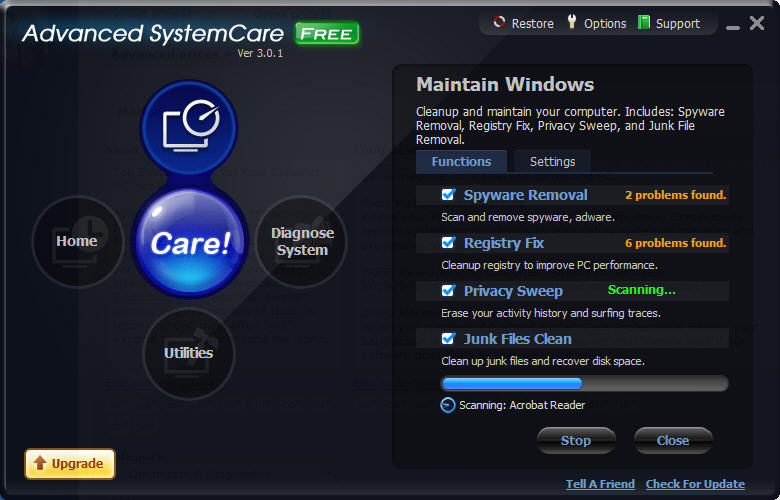
Premium Advanced System Care
Note: You must be disconnected from the internet when you insert your serial key. It will give you an error, just hit next and it will work fine. After it says you have premium you can re-connect to the internet.
Serial Key
48F0-48F0-F0FF-0CD7
Maintain Windows
this is going to be one of your main tools for making your computer run faster. All you have to do is hit "Scan" and then hit "Fix." Do not be afraid if you get 9583 errors in your registry Like I did, just hit fix and it will do all the work!
Diagnose System
Simply hit "Scan" and once it is done hit "fix." For the security analyzer it is a bit tricky, you will have to go in manually and select "fishy" programs from the list and hit fix. Just because it is on the list doesn't mean its malware. The list simply shows the files that are commonly targeted by malware programs.
Reccommended Settings
Here I will list the settings that I use and highly recommend for all of you. Click on "Maintain Windows" then select the tab that says "settings" a new window will show up. Make sure you enable "Deep Scan" this will take longer then the regular scan but does it more thoroughly and will clean up more space. Next click on "Automated Care" this is where you tell the program what to automatically do and when. I selected "Perform care when system is idle" and have it scan once a week.
Utilities
This is the final tab of the program and contains the same kinds of software that windows comes with but is better made, faster and more efficient. First click on the "Disk Cleaner" this is the same program that Microsoft default uses and will clean up some small but useful space. Next click on "Disk Doctor" select which hardrives (assuming you have more then one) you want to analyze and click next. The program will start analyzing your hardrive, you will get information back whether or not the software found errors in your hardrives. The next program is "Internet Booster" simply click on the icon and you will get a pop up, I would click on "Auto Optimize" and let the program do its job. It will ask you what your bandwidth is, I have the best AT&T Internet package I can get in my area so I'm at 1mb/s. Simply hit "Optimize" and the program will do the rest. The final program is SmartRAM this program will help you with your bots as it will free up RAM that the computer did not use or is "hiding." Click on the "smartRAM" icon to get started. Simply hit "Go" and your computer should free up some RAM almost instantly. My computer freed up 293 RAM on the first run!
netscream

netscream is a program that advertises to increase your computers internet speed by 200%. I myself have noticed a increase in download/upload speed so far, as for regular internet speed.
Premium/Serial Number
unlike the above programs you have to "patch" your netscream first. Download it from the link above the picture that says "netscream." Then download this program once you have downloaded this program simply run it and click on the drop down list to "netscream" hit patch. Then you have to find your netscream.exe
For windows 7:
C:\Program Files (x86)\NetScream
for all other OS simply go into program files. select your "netscream.exe" and hit "patch" wait for it to complete, it should say "patch applied." Click "Generate" and then enter the name+serial. Enjoy Premium :)
Netscream Performance
Assuming you have premium simply click and drag the "fast" to "fastest" let it load and you should see a increase (up to 200%) in internet connection!
MzRAMBooster
Note: This program is designed for Windows 7 and will work best on this OS.

Options
This is the main section you are going to be looking at if you want to speed up your computers performance. I have it set on
Auto Optimize If free ram is below: 1000
Pause between Optimize-Minutes: 5
Auto Optimize every: 15 minutes
Try to recover: 100 MB
Load on startup: yes/checked
Optimize on startup: yes/checked
Beep when optimizing: yes/checked
check for updates on start: yes/checked
Then simply hit apply Values and your set :)
SmartDefrag2

Smart Defrag2 isn't like windows defrag. This simple program took me only 5 minutes when I ran it the first time, my hardrive was fragmented 5.00%. Visit the link above to checkout this cool program, all you really have to do is hit defrag and relax :)
freeapps

Free-Apps is a free software program downloader that will download other software for you. The reason this program is on the list is that every-time any of your installed programs update it will show-up and you can one click download/install all of the updates!


No comments:
Post a Comment